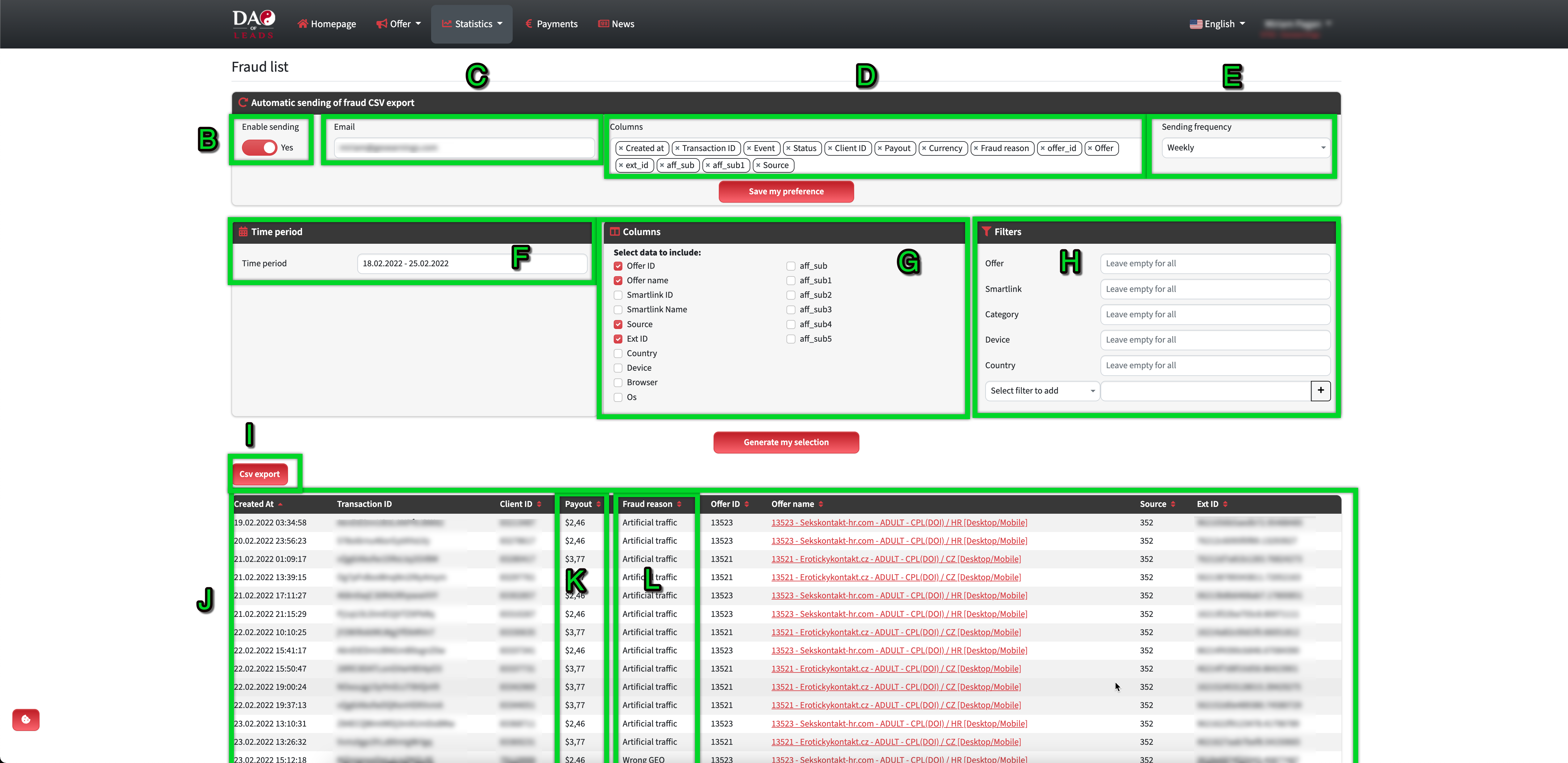
Here you can manage the automatic sending of fraud reports to your email address.
Set those (Point A-E) and then click to "Save my preference"
Point A - Go to the "Statistics / Fraud List"
Point B - here you can mark YES(RED mark) or NOT(GREY mark)
Point C - Email address to which the frauds should be sent. (As the default value is set your email address is assigned to your affiliate account.)
Point D - You can manage all the columns that you need to see in the report.
Point E - Set how often you want to receive the fraud reports. We have these options: Daily / Weekly / Monthly.
Filters in the fraud leads.
Point F - Select the time period.
Point G - Choose which columns/affiliate parameters you want to see in the statistics.
Point H - Use filters to see frauds for example from one offer or source.
Point I - Export filtered data to ".csv"
Point J - FIltered data.
Point K - Payout for the specific lead (If the lead is rejected means it will NOT be paid.)
Point L - Reson why was the lead rejected.